« Are Collaborative Systems Good for Outsourcing? | Main | Learning to Use Google Analytics, Part 5 »
Friday
15Jun

Using MindMeister to Map Project Blog Survey Comments

By Dennis D. McDonald

While writing up notes for my Project Blog Survey,  I learned from George Dearing about the new MindMeister product, a web based "mindmapping" tool that supports graphical concept mapping, collaboration, and group Skype calling.

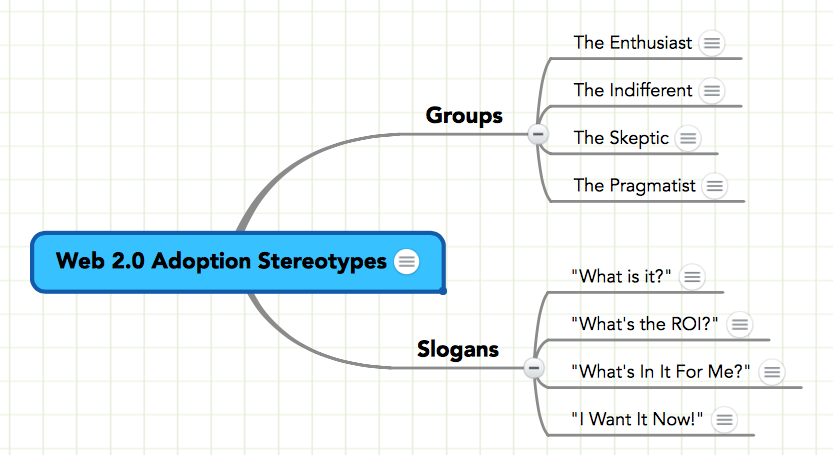
I haven't tried out MindMeister's collaboration functions yet, but I have experimented with the basic tool as a concept outliner for issues raised by and during the initial interviews on this survey about the use of blogs as project management tools. I like the functionality, and I also like the way you can embed a view of the concept map in a web page. See the example here or immediately below which reflects in real time changes made to the model (use your mouse pointer to drag the image, to "mouseover" notes icons, or to click the small junction circles):


PrintView Printer Friendly Version

EmailEmail Article to Friend

Reader Comments (4)

Our team launched a new collaborative web-based mind mapping tool called Comapping. It is worth checking it out at <a href="http://comapping.com">comapping.com</a>.
June 16, 2007 | Unregistered Commenteromar
Omar,

Your link got garbled in translation. This is the correct link:

http://comapping.com/

- Dennis
June 16, 2007 | Unregistered CommenterDennis McDonald
I've discovered an interesting feature: one of the "export" formats is RTF which allows for exporting a text only version of the map that can then be manipulated using a word processor.It incorporates heading level information, too.
June 16, 2007 | Unregistered CommenterDennis McDonald
thanks would be great to have your thoughts on comapping.com
June 17, 2007 | Unregistered Commenteromar

PostPost a New Comment

Enter your information below to add a new comment.
Author Email (optional):
Author URL (optional):
Post:
 
All HTML will be escaped. Hyperlinks will be created for URLs automatically.